
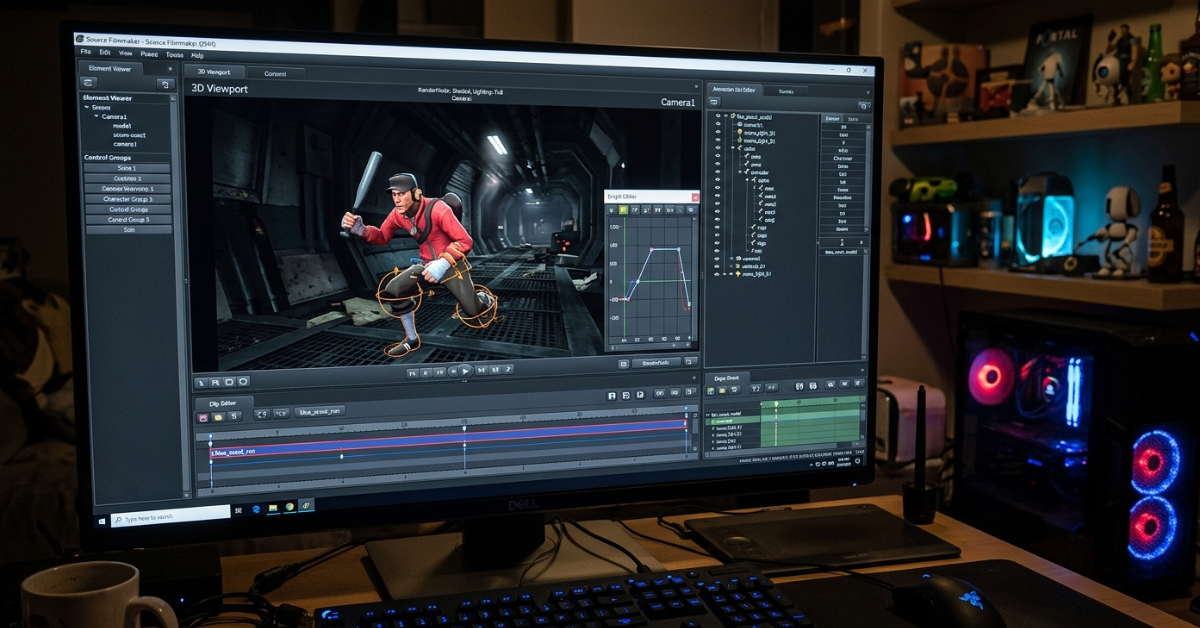
If you have ever tried importing a custom character or prop into Source Filmmaker and ended up with missing textures, a broken model, or an asset that simply refuses to appear, you have probably encountered sfm compile.
The term can sound more complicated than it really is. In most Source Filmmaker workflows, compilation is the process of converting custom models and other source assets into formats that the Source engine can actually load. It can involve SMD or DMX files, QC scripts, StudioMDL, textures, materials, and supporting model files.
There is also some confusion around the phrase because people sometimes use “SFM compile” when talking about rendering or exporting a finished animation. This guide focuses primarily on the asset-compilation meaning, while also explaining the difference between compiling an asset and rendering an SFM project.
What Is SFM Compile?
SFM compile is the process of preparing a custom asset for use in Source Filmmaker.
For example, imagine you create a character in Blender. The Blender project itself is not a native Source model. You generally need to export the appropriate data, create a QC file containing compilation instructions, and then use a Source-compatible compiler to create the files SFM can read.
A simplified model workflow looks like this:
3D model → SMD/DMX → QC file → StudioMDL/Crowbar → compiled model → Source Filmmaker
The resulting model commonly uses files such as:
- MDL — model information and structure
- VVD — vertex and geometry data
- VTX — optimized rendering data
- PHY — physics/collision information when included
Textures and materials are handled separately through Source material formats such as VMT and VTF.
Why Do You Need to Compile Models for SFM?
Source Filmmaker does not simply open every 3D format produced by modern modeling software.
A file such as a Blender project, FBX, or OBJ may contain valuable model information, but that does not automatically make it an asset that Source Filmmaker can load. Compilation acts as the bridge between your original creative files and the Source engine.
Compilation can define or process things such as:
- Mesh geometry
- Bone structures
- Materials
- Texture paths
- Animation sequences
- Physics information
- Model names and locations
- Level-of-detail settings
This is why a model can look completely correct in Blender and still appear incorrectly inside SFM.
SFM Compile Tools You May Need
There is no single universal “SFM Compile” application. The workflow normally involves several Source-related tools.
StudioMDL
StudioMDL is the Source model compiler. It reads a QC script and processes the model information into Source-compatible model files. SFM installations include the relevant compiler tools in their game/bin directories.
Crowbar
Crowbar is a commonly used community utility for Source model workflows. It provides a graphical interface for tasks such as compiling and decompiling Source models, making the process easier for users who do not want to work entirely through Command Prompt.
Blender and Source Tools
Blender can be used to create and prepare custom models. An appropriate Source export tool can then export model information in formats such as SMD or DMX.
Texture Tools
Textures require their own Source-compatible material setup. Image files may need to be converted into VTF textures and referenced through VMT material files, depending on the workflow.
How to Compile a Model for Source Filmmaker
The exact workflow depends on the model and tools you are using, but the general process is straightforward.
1. Prepare the 3D Model
Start with a properly modeled and rigged asset in Blender, Maya, 3ds Max, or another compatible application.
Check the following before exporting:
- Correct scale
- Correct orientation
- UV mapping
- Bone hierarchy
- Skin weights
- Material assignments
- Animation data, if required
Fixing these issues before compilation can save a lot of troubleshooting later.
2. Export the Model
Export the necessary model data into a Source-compatible format such as SMD or DMX.
The exported files contain information that the compiler can process. They are not necessarily the final files that SFM will load.
3. Create a QC File
The QC file is one of the most important parts of the process.
It acts like an instruction sheet for the compiler. Depending on the model, it can specify the model’s output name, mesh files, materials, skeleton, animations, collision information, and other settings.
A simplified example might look like:
$modelname "characters/example/example.mdl"

$body "Body" "example.smd"

$cdmaterials "models/characters/example/"

$sequence "idle" "idle.smd"
The exact commands required depend on the asset, so a production-ready QC file will usually be more detailed.
4. Run the Compiler
Once your model files and QC script are prepared, run StudioMDL or a compatible interface such as Crowbar.
The compiler reads the QC instructions and generates the Source model files.
5. Place the Compiled Files Correctly
The resulting model files need to be placed in an appropriate SFM game directory, with the folder structure matching the paths specified by the model and material files.
Incorrect folder paths are one of the most common reasons an apparently successful compile does not work correctly in SFM.
Common SFM Compile Problems
Even when the compiler finishes without an obvious error, the model may still fail inside Source Filmmaker.
Here are some common problems worth checking.
Purple and Black Checkerboard Textures
A missing texture often appears as the familiar purple-and-black checkerboard pattern.
Check:
- Your
$cdmaterialspath. - The location of your VMT files.
- Whether the VMT references the correct VTF.
- Whether capitalization and spelling match.
- Whether the required texture files are actually inside the game directory.
The model itself may be compiled correctly while the material setup is wrong.
Model Appears in a T-Pose
A model stuck in a T-pose can indicate problems with:
- Rigging
- Bone names
- Animation sequences
- QC configuration
- Exported animation files
If the character loads but refuses to animate, inspect the skeleton and $sequence configuration first.
Model Does Not Appear
If SFM cannot find the model, verify the path and filename.
Also make sure the compiled MDL and its associated files are together in the appropriate directory structure.
Compilation Errors
Compiler messages are useful rather than something to ignore. They can identify missing files, invalid paths, malformed QC commands, or problems with the model structure.
A good troubleshooting habit is to fix the first meaningful error in the compiler output before worrying about the errors that follow it.
SFM Compile vs SFM Rendering
This distinction is important because the phrase SFM compile is sometimes used in two different ways online.
Asset Compilation
This is the technical Source-engine process:
SMD/DMX + QC → MDL and supporting files
It is primarily about making custom assets usable by Source Filmmaker.
Rendering or Exporting
The other use refers to turning a completed SFM scene into a finished video or image sequence.
In that workflow, you already have your models, cameras, lights, animation, and timeline. The goal is to process the finished scene and create something that can be viewed or edited outside SFM.
Some online guides call this a “compile,” although render or export is generally a clearer description.
What Does “SFM Compile Club” Mean?
Searches for sfm compile club can be confusing because the phrase may be used online as a search term for communities or websites sharing SFM-related content rather than as the name of an official Valve compilation tool.
There is no reason to assume that a website using “SFM Compile” or “SFM Compile Club” in its name is an official Source Filmmaker service.
If you encounter an unfamiliar website using these terms, check:
- Who operates the website
- Whether it is affiliated with Valve
- What files or downloads it provides
- Whether downloads are trustworthy
- Whether the content is appropriate for your intended use
- Whether the site requests unnecessary personal information
For technical SFM work, it is safer to focus on established Source-engine tools and documented workflows rather than assuming that a site is official because its name contains “SFM.”
What About Fortnite, Overwatch, Marvel Rivals and Other SFM Searches?
Search queries such as fortnite sfm compile, sfm compile fortnite, overwatch sfm compile, and marvel rivals sfm compile often combine the SFM format with the name of a particular game or character.
The underlying technical idea remains similar: users may be looking for Source-compatible models, animation resources, tutorials, or SFM projects related to a particular game.
However, compatibility is not automatic. A model from another game may use a completely different engine, skeleton, material system, or file format.
Before attempting a conversion, check:
- Which engine the original game uses.
- Whether the model can legally be extracted or converted.
- Whether an SFM-compatible version already exists.
- Whether the model’s rig can work with SFM.
- Whether the textures and materials can be recreated correctly.
For example, Marvel SFM compile, Marvel Rivals SFM compile, and Fortnite SFM compile should not be interpreted as official Valve compilation formats. They are usually searches combining SFM with content from another game.
Understanding NSFW SFM Search Terms
Search engines may also return adult-content queries alongside technical searches, including phrases such as sfm compile porn, futa sfm compile, sfm compile creampie, sfm compile blowjob, chun li sfm compile, mk1 porn sfm compile, and emma frost sfm compile.
These searches generally combine SFM with adult or character-specific content. From a technical perspective, however, the word compile does not create a separate SFM format for adult material.
The same underlying asset concepts apply to ordinary character models:
- Model files
- Rigging
- Materials
- Textures
- Animation data
- QC configuration
- Source-engine compatibility
It is also worth remembering that fictional characters from games and entertainment franchises can be protected by copyright and other intellectual-property rights. A technically successful conversion does not automatically mean that redistribution or commercial use is permitted.
How to Make Your SFM Compile Workflow Easier
If you regularly create custom SFM content, organization makes a surprisingly big difference.
Try keeping separate folders for:
Project/
├── Source/
│   ├── SMD/
│   ├── DMX/
│   └── QC/
├── Textures/
│   ├── VTF/
│   └── VMT/
└── Compiled/
    ├── MDL/
    ├── VVD/
    ├── VTX/
    └── PHY/
A consistent naming system also helps prevent accidental path errors.
A Useful Checklist
Before compiling:
- Check the model scale.
- Check the skeleton.
- Verify UVs.
- Check material names.
- Confirm texture paths.
- Review the QC file.
- Keep filenames simple.
- Check the compiler log.
After compiling:
- Load the model in SFM.
- Test the textures.
- Test the skeleton.
- Test animations.
- Check physics if applicable.
- Test the model in an actual scene.
This approach makes it much easier to determine whether a problem comes from the model, materials, animation, or compilation stage.
Is SFM Compile Difficult for Beginners?
The first few attempts can feel technical, particularly if you have never worked with QC scripts or Source-engine folder structures.
The good news is that you do not need to understand every Source-engine command immediately.
Start with a simple prop or character and learn the workflow one stage at a time:
- Export a basic model.
- Create a simple QC file.
- Compile it.
- Load it into SFM.
- Fix any errors.
- Add materials and animation.
- Move on to more complicated assets.
Once you understand how SMD/DMX, QC, StudioMDL, MDL, VTF, and VMT fit together, the process becomes much less mysterious.
Frequently Asked Questions About SFM Compile
What does SFM compile mean?
SFM compile usually means converting custom Source Filmmaker assets into formats that the Source engine can load. For models, this commonly involves SMD or DMX files, a QC script, and StudioMDL or another compatible compiler.
Is SFM compile a program?
Not exactly. “SFM compile” generally describes a process rather than one official program. Tools such as StudioMDL and Crowbar can be used as part of that process.
What is a QC file in SFM?
A QC file is a text-based compilation script. It tells the Source model compiler how to build the model, including information about meshes, materials, animations, and other model settings.
Why is my SFM model purple and black?
The purple-and-black checkerboard usually indicates a material or texture problem. Check your VMT/VTF files and make sure the material paths in your model’s configuration point to the correct locations.
Can Blender models be used in SFM?
Yes, custom Blender models can be prepared for Source Filmmaker, but they generally need to be exported into a Source-compatible format and compiled using the appropriate workflow.
Is SFM compile the same as rendering?
No. Asset compilation prepares models and other Source assets for use in SFM, while rendering/exporting turns a completed SFM scene into a video, image sequence, or still image. Some websites use “compile” loosely for both processes.
Conclusion
SFM compile is best understood as the technical bridge between custom assets and Source Filmmaker. For models, the workflow typically involves preparing SMD or DMX data, writing a QC script, running a Source compiler, and placing the resulting files in the correct SFM directories.
Once you understand how models, textures, materials, QC scripts, and compiled files connect, troubleshooting becomes much easier. Instead of randomly moving files around, you can identify whether the problem is coming from the model, animation, material path, or compilation step.
If you are new to Source Filmmaker, start with one simple custom asset and work through the complete pipeline. That hands-on approach is usually the quickest way to turn sfm compile from a confusing search term into a practical part of your SFM workflow.